rqlock1.20
Publisher Description
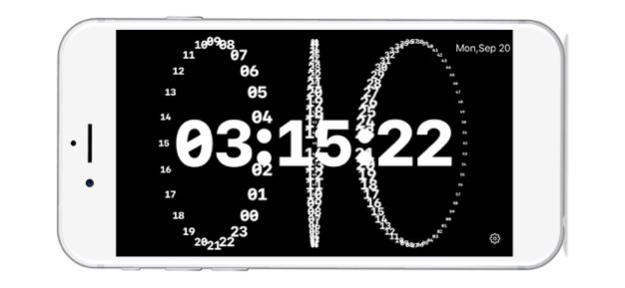
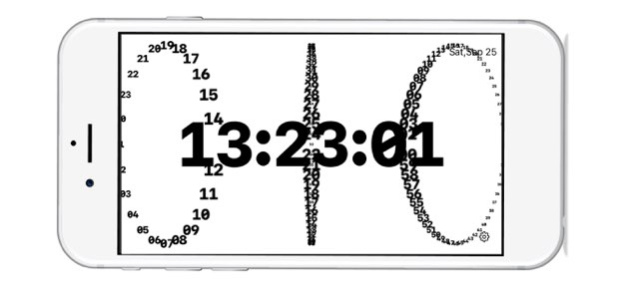

"rqlock" is a clock app for iPhone and iPad that displays the time with numbers rotating in 3D dimension.
■ Features
1. Includes 3 different types of GUI.
2. Changes the rotation speed of numbers.
3. Changes the background color between black and white.
Enjoy the 3D movement of the numbers!
■ Subscription
Please refer to the following for terms and conditions regarding the use of subscriptions.
1. Privacy policy: https://rqlock.com/privacy-policy
2. Terms of use: https://rqlock.com/terms-of-use
Version History Sound function (second hand sound) added. 1.20 01/06/2023 Fixed a bug in the UI display. 1.14 02/15/2022 Fixed a bug in the movement of numbers. 1.13 02/14/2022 Bug fix. 1.12 02/13/2022 Bug fix 1.11 02/12/2022 Rebuild for iOS15.3 1.1 02/12/2022 Small bug fix. 1.01 09/26/2021 1.0 09/23/2021
About rqlock
The company that develops rqlock is SHIGERU OKADA. The latest version released by its developer is 1.20.
To install rqlock on your iOS device, just click the green Continue To App button above to start the installation process. The app is listed on our website since 2026-10-14 and was downloaded 0 times. We have already checked if the download link is safe, however for your own protection we recommend that you scan the downloaded app with your antivirus. Your antivirus may detect the rqlock as malware if the download link is broken.
How to install rqlock on your iOS device:
- Click on the Continue To App button on our website. This will redirect you to the App Store.
- Once the rqlock is shown in the iTunes listing of your iOS device, you can start its download and installation. Tap on the GET button to the right of the app to start downloading it.
- If you are not logged-in the iOS appstore app, you'll be prompted for your your Apple ID and/or password.
- After rqlock is downloaded, you'll see an INSTALL button to the right. Tap on it to start the actual installation of the iOS app.
- Once installation is finished you can tap on the OPEN button to start it. Its icon will also be added to your device home screen.
Program Details
System requirements
Download information
Pricing
Version History
version 1.20
posted on 2026-10-14
Version History Sound function (second hand sound) added. 1.20 01/06/2023 Fixed a bug in the UI display. 1.14 02/15/2022 Fixed a bug in the movement of numbers. 1.13 02/14/2022 Bug fix. 1.12 02/13/2022 Bug fix 1.11 02/12/2022 Rebuild for iOS15.3 1.1 02/12/2022 Small bug fix. 1.01 09/26/2021 1.0 09/23/2021
version 1.20
posted on 2023-01-06
Jan 6, 2023
Version 1.20
Sound function (second hand sound) added.
version 1.20
posted on 2023-01-06
Sound function (second hand sound) added.
